Showing posts with label laser cutter. Show all posts

Tuesday, January 21, 2014

Matter Control Set Up

Okay, I didn't get the video done this morning. But I had a good reason. I had to go over to City Hall in San Leandro and get Mind-2-Matter's business license! I've been trying for a couple of weeks to get over there, but the planning department has wonky hours. They work a full day Monday and 8-12 Tuesday through Thursday and are closed on Fridays. Yesterday was a holiday (and last week I don't think I ended up in San Leandro during business hours), so I got it taken care of today.

I did get some screen captures done of the set up for Matter Control today. I haven't had a chance to run anything yet (there are never enough printers because we're so busy!), but set up is super easy.

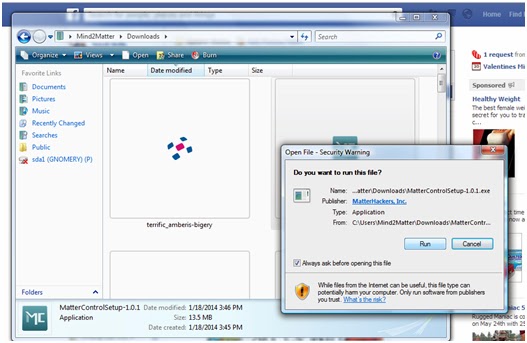
The usual - download the file and run it. 

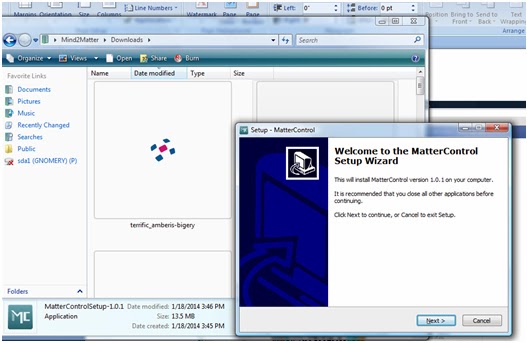
Follow the Setup Wizard (I'm pretty sure you don't need a play by play of this step)
I'm jumping ahead to opening the program in the next step so don't think you missed anything. 
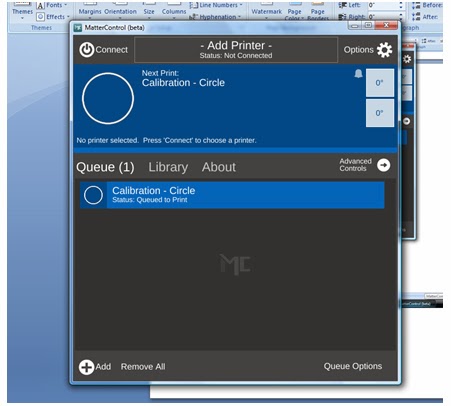
This is the default screen when you open it for the first time. 
This is where you will set up your printer (and where I found out about the Airwolf printers. I want to get my hands on one so I can see if it lives up to such a badass name).

Click on the center where it says "add printer".


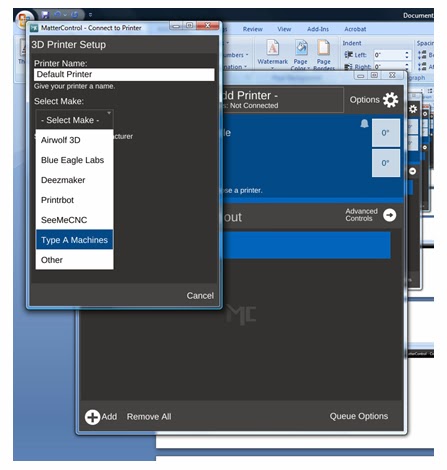
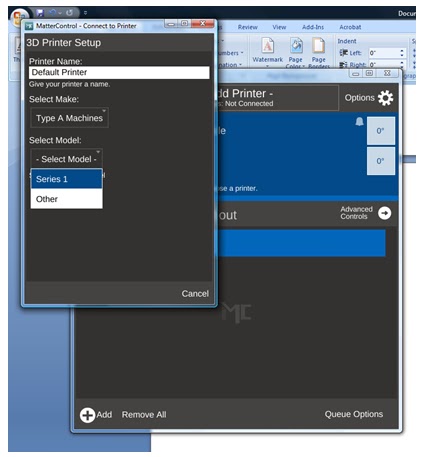
In this screen you can name your printer (really helpful when you have a wall full of printers to try to keep straight) and you are able to select your make and model of printer (which will lead you to the right drivers to install).

They are listed in alphabetical order, but look there's the Airwolf!
Really though, if you want dependability, go with the Type A Machines - We're running 5 right now!
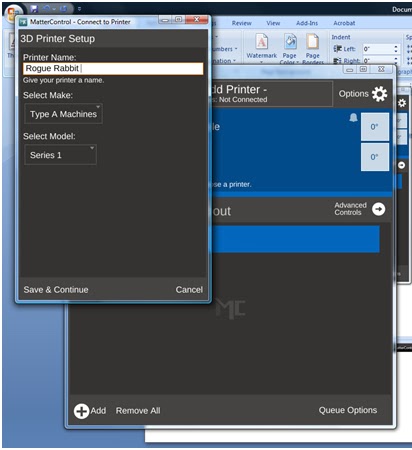
Select your model - We've got the Series 1. 
And choose a name. Obviously - Rogue Rabbit is an appropriate name.
Maybe when we get the Tantillus printers up and running, I will make one named Rogue Rabbit. 
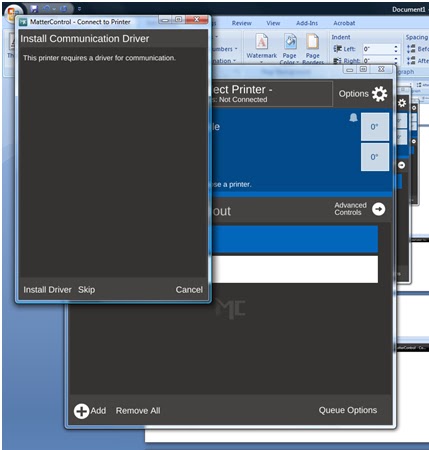
Install your drivers. 
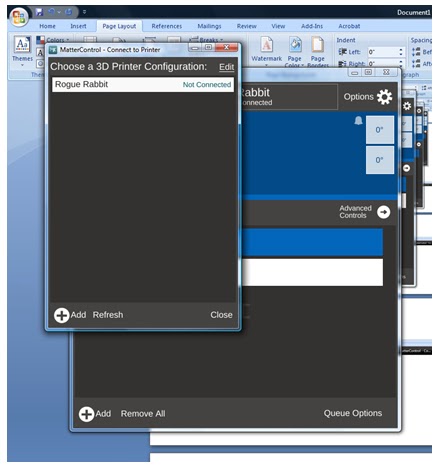
After installing drivers and testing communication, you are ready to choose your printer. 
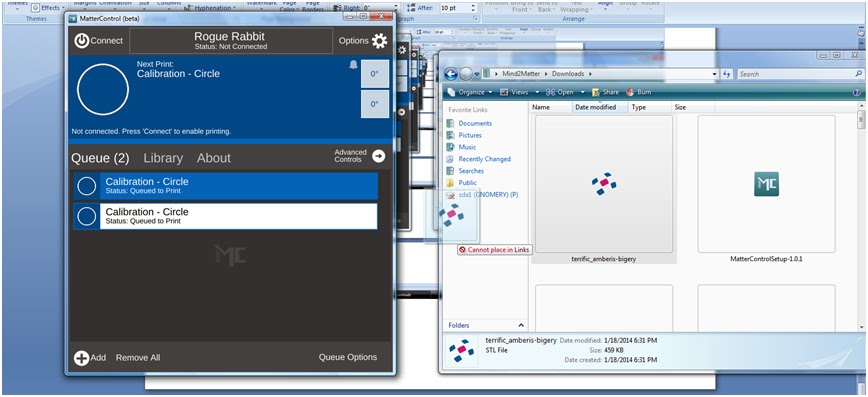
Here's one of the cool parts - Drag and drop file queuing. I've downloaded one of my models from TinkerCAD,
and just dragged it over to my queue.

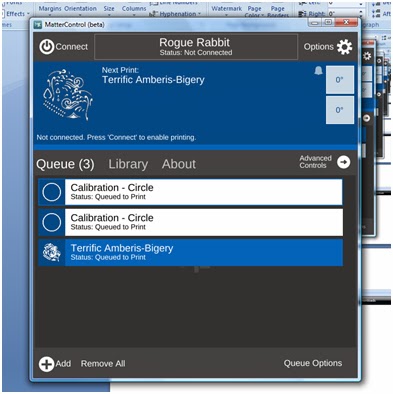
And here's my file added to the queue. 
I'll try to get my hands on a printer tomorrow to run a print job.

Like I've said, I'm a total novice when it comes to printing. Justin has ALL the printing skillz because he's seriously spent like the entire last year with the printer. He knows the ins and outs better than anyone does of the Type A Machines Series 1. He also knows the hassles of other printer controllers.

I'll play with it and ask his opinion on it as an "expert".

BTW, added a few new pieces of art to our Society6 page, including this awesomeness! I don't even like throw pillows, but I would order one.


Sunday, November 10, 2013

The Mini Figs Have Landed


I did not get around to making my videos this weekend illustrating the issues with M0rt1m3r.

I spent some time in my garden. I made real cupcakes for my husband. I made a spice cake for myself (with eggs and that was NOT the best idea).

I broke down and bought LED light bulbs for the kitchen ceiling fan (and of course, the hardware store had 2 standard and 2 candelabra bulbs on the same rack - Get home and only 2 will work for our fixture.   BLAH). I have to say even having just the 2 is great (though we have only had 1 of 4 bulbs working for lord knows how long).

Put up some shelves yesterday:


And organized our Lego Minifigs today:


I also organized the bookcase. We finally have books on most of our bookcase instead of stuffs. 

I totally had something I wanted to write about earlier but for the life of me can't remember what it was. 

For now, enjoy the assortment of mini figs. Items to note:Gnome, Spongebob (x2), Sandy Cheeks, The Flying Dutchman, some robots, skeletons, and a hippie. 


Thursday, November 7, 2013

Golden........


I threw in some silver AND gold tonight.

I can't say I'm thrilled with the time change though. I don't like walking home in the dark. Or walking the dog in the dark when I get home. Point being, I like it when it's light out. The early darkness makes me feel like I should be in bed.

Made the awesome Puerto Rican Pulled Pork recipe that I found in a Costco Magazine of all places (I totally put it in my llama recipe journal). Speaking of Costco, I picked up meat there last week and have been good to go all week!  Yay me. I made a pork roast last Saturday and another today. Did some meals with ground beef (burgers and sauteed veggies with an avocado are my quick go to meal on school nights).

I accidentally over cooked my cauliflower yesterday (it was pretty brown, not quite blackened though) and it was delicious!

I'm settling into a better routine when it comes to cooking and working and making art. While I didn't keep doing a tangle EVERY day after the initial 36 days, I come home and work on SOMETHING just about every day. And I don't beat myself up if I want to go to bed early or read a book.

So I finally heard back from Craftwell yesterday and the conclusion they came up with is "you have your pressure settings too high" so it's your fault your paper is snagging. My pressure was set at 4. My paper was a very heavyweight card stock. I've tried going lower than 4 and it barely even presses in to the paper and does not cut. So it looks like I will be preparing more videos outlining the outcome of EVERY pressure setting, starting at 1.

It's pretty weak when a company makes excuses for their product. The eCraft should be able to cut 40 circles on a single page. It should also have some sort of speed control, be it on the machine itself or a speed control in the software. Everything shouldn't be blamed on the user. I have photos of paper snagging back when I first got it and it was doing it even when I was attempting to cut 5*7 rounded rectangles (I definitely would NOT call that a complex cut!).

Tuesday, November 5, 2013

Insert something witty here......


I decided to change things up a bit today and add some gold into the mix.

Had class tonight and missed out on company bowling night. Booo. And for what? So I could sit in a lecture about how to use the computer and do research at the library.

I guess sometimes I forget that people aren't necessarily willing to "figure it out" themselves (I forget this at work as well). Apparently curiosity is not natural and most people need step by step instruction for everything. Personally, I would rather just be let go with something and figure it out. The way someone tells me how to do something may not be the most efficient way.

I guess my desire to "figure it out" helps me in the workplace as well. I have to look at photos of products that I have never touched and answer some insane questions some of the time. I also have to figure out how to explain assembly instructions over the phone for products I've never seen. I'd like to think I'm pretty good at it.

I've got to provide MMR vaccination records to SFSU. Really?! I can only assume I had the MMR vaccination in Placerville somewhere, so I will have to ask my mom.

I'm working on some ideas and will have some cool projects coming up. I'll share them as I get them together.


Sunday, November 3, 2013

Photo time!

I worked on a photo project today (I bought 2 photo collage frames on super discount at Blick for like $11 each. They were clearance and the cashier still applied a 40% off coupon). Scissors and the xacto knife are hell on my arm. I wasn't even using either for very long, but now I'm in pain. 

I was going through photos looking for stuff to print and place in the frames. Really though, I think I spent more time reading today. I went to the bookstore. God I miss bookstores. (and coffee houses. Not a flipping starbucks or peet's. Actual coffee houses.)

I also had a moment of thinking to myself that I hate music. I never thought those thoughts would enter my mind, but between all of the noise coming from all sides of me at all times, I think I hate bass. I almost think the relentless beat that sounds the same for hours on end is what has driven me to listen to short, fast and loud punk songs again. 3 minutes tops. on to the next. (oh and probably Jess's Joey Ramona Quimby costume on New Girl). When I listen to music while working it is largely bass free but then I'm faced with the constant ripping noise of packing tape. I've recorded audio because no one seems to realize how annoying that sound is. 

Here are some of the photos I'm going to use. (and a few that I'm not going to use - but I like them anyway. 


The very olden times. 2007

Thursday, October 31, 2013

Tangle Time


I tangled today.

We had a costume contest at work. We were supposed to dress up based on our favorite collection. I was set to do retro kitchen (hence making cookies last night) but my dress no longer fits. So I changed things up to be inspired by the Designer's Domain collection. I busted out my art apron (totally different than my cooking apron, which is super cute), some pens, paintbrushes, charcoal, paint and the like. I stuck a bunch of paintbrushes in my hair and put on my glasses.

I showed up for work being comfy and ready to make art. Oh and I brought cookies. Because I'm rad like that. The whole office was able to enjoy them, which was nice. I know a few people have dietary restrictions and don't normally get to partake in treats. My cookies were grain free and vegan. Perhaps if you are lucky, I will eventually share the recipe.

I have to say we had some pretty good costumes for those of us who dressed up. Film Noir, Retro Reboot, Swiss Ski Chalet and even New England Clambake were represented.

One coworker dressed for Retro Reboot and pretty much clinched the title when she busted out her Nintendo Powerglove as her finishing accessory. There were a couple of people who had no clue what it was. Hopefully we can use it for company game night.

I didn't spend anytime with M0rt tonight. Taking a step back and allowing my frustration to subside. When I sent my inital email to Craftwell, I got a prompt response the next day telling it it was likely user error causing my issues. Well, I sent off all three videos (ecraft issues, mtc test and mtc results) and haven't heard anything back from Craftwell yet.

We'll see what happens. That file should not be beyond the capabilities of M0rt. I had a similar issue when cutting our wedding invitations as well and those were 5x7 rounded rectangles. 2 to a sheet of paper. Are you going to tell me that project is too much for it to handle as well? I hope not.

It's well beyond Amazon's return window. Perhaps I should have gone with the Cameo, which was my original plan.

That being said. I still need a laser.

Blah blah blah so mad (at eCraft)

Okay, I'm still working on M0rt issues. While it seems that MTC is a bit more stable using Win7 64bit v 32bit, there are some issues with M0rt himself (or it could be eCraftshop Pro. In fact, give me a minute and I will check that.)

Okay, I'm back. There was still some slight snagging using MTC, but nothing to compared to the amount using eCraftshop Pro. While I can't entirely confirm based upon 2 quick tests to create a video to show a CS rep that I'm NOT talking about paper getting caught in the rollers, it does seem there are some flaws in eCraftshop Pro.


The first thing I notice is that MTC slows the cuts WAY down. It also seems to prioritize cuts in a different manner and cuts closer to a row formation than jumping back and forth between front and back of paper. For the life of me, I can't figure out how eCraftshop Pro prioritizes cuts. It doesn't make a difference if you select the prioritize cuts check box or not.

You may have noticed that I haven't posted anything awesome in a few days. Well, that is in part due to the issues I'm trying to resolve. You can't do work if your shit isn't straight.

 I don't want to get all snippy with the CS person because that doesn't really make things better. But to tell me that I have way too many objects in my file (40 circles with a line half way through) is ridiculous. If there are object limitations, please be honest with it. Don't allow your software to work on anything over ___ number of cuts. I certainly wouldn't have purchase it if that were the case and they were honest about it.

In fact, here's the email I got:

"I can see why it snags. There are over 40 images on this one file!
The machine most likely will snag on already cut portions of the page when repositioning and moving the paper / trolly around, not when it is making the actual cut.
Realistically, there is no real solution to this other than to decrease the amount of circles your are cutting.
If you have multiple images already cut and they run across the trolly enough times, its gonna snag them. It's simply physics.

I would recommend just putting your tab settings to the highest possible before starting the cut.

The tabs should help keep the already cut circles in place (for the most part) and help your cutting.

Or re-create the .svg so that the eCraft cuts in order from left to right, top to bottom. "
I was pretty specific that the snagging occurs when the blade enters the paper in my initial email. It snags the paper on the first cut. You can't say that's "physics".

This would all be absolved if I had a laser. Then I would just risk burning the paper edges (which could be a really cool effect).

I did make cookies tonight. I was going to dress as Retro Kitchen for work tomorrow (we're supposed to dress as our favorite collection), but I think I'm going as Artists Den instead.