Showing posts with label Mind-2-Matter. Show all posts

Saturday, March 8, 2014

Working with Chance - Shifted Perspective

After thinking about what we have been discussing indeterminacy and working in chance in my conceptual strategies class, I decided to apply it to my independent studies class as well.

In 3D printing, a lot of variables are left to chance. There is no guarantee that your print will be successful. If you print the same object 1,000 times, there are any number of things that will effect the outcome. Ambient temperature, material, hot end temperatures, computer issues, hardware issues, and more can change the outcome of your print.

Case in point:


This is an 18 gallon tote filled with failed prints (going back about a year - there are more that have been thrown away or are in other boxes as well). Some failed due to equipment failure. Some failed due to material failure. Some of them we have no clue as to why they failed. 

This box is intended to be run through a "filabot" style machine to reclaim the expended filament. Mind-2-Matter and LaserGnomes try to be as green as possible, so reclaiming spent filament is inline with our  business plans. I figured in the meantime, I could do a bit of reclamation myself. 

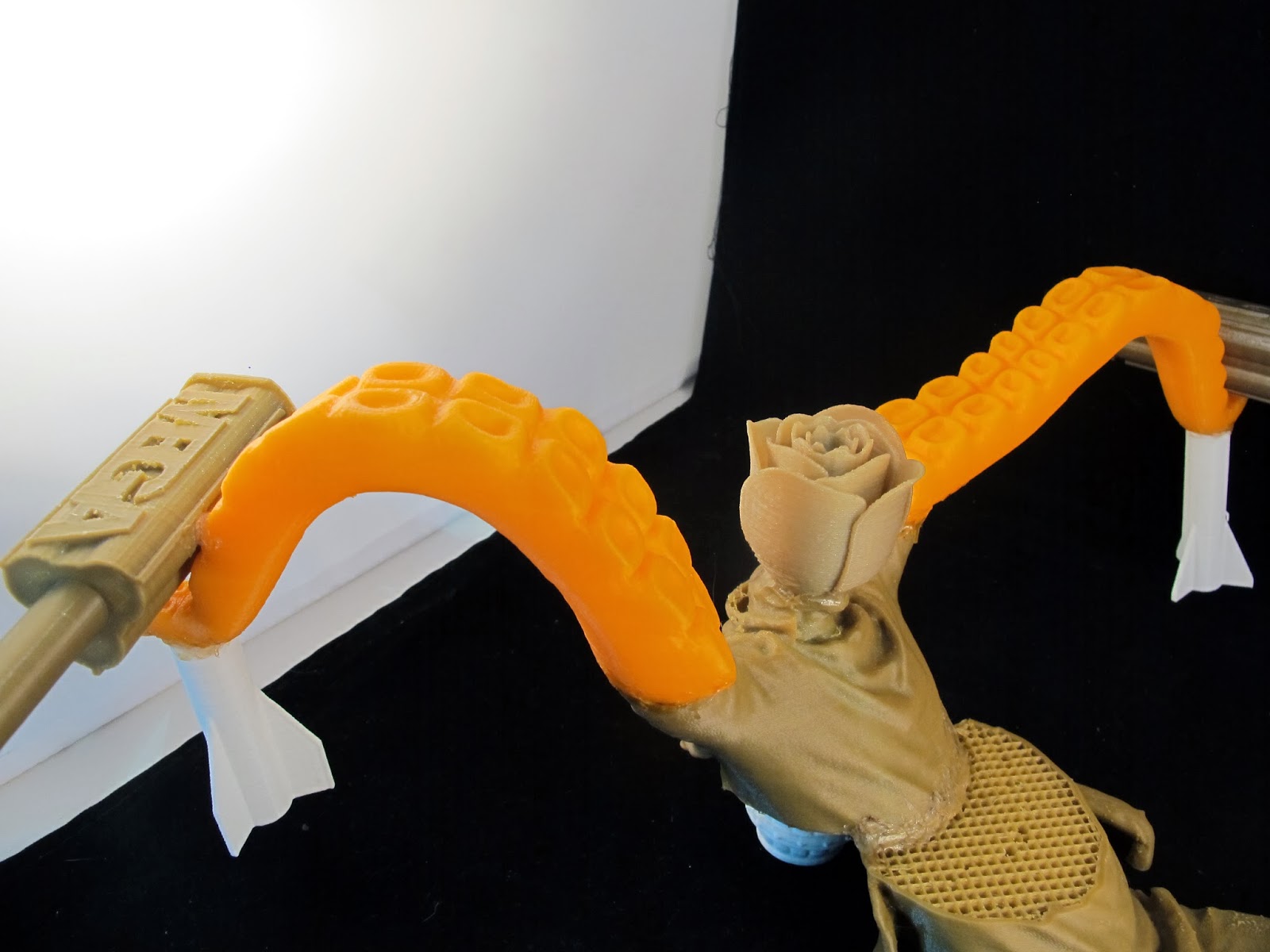
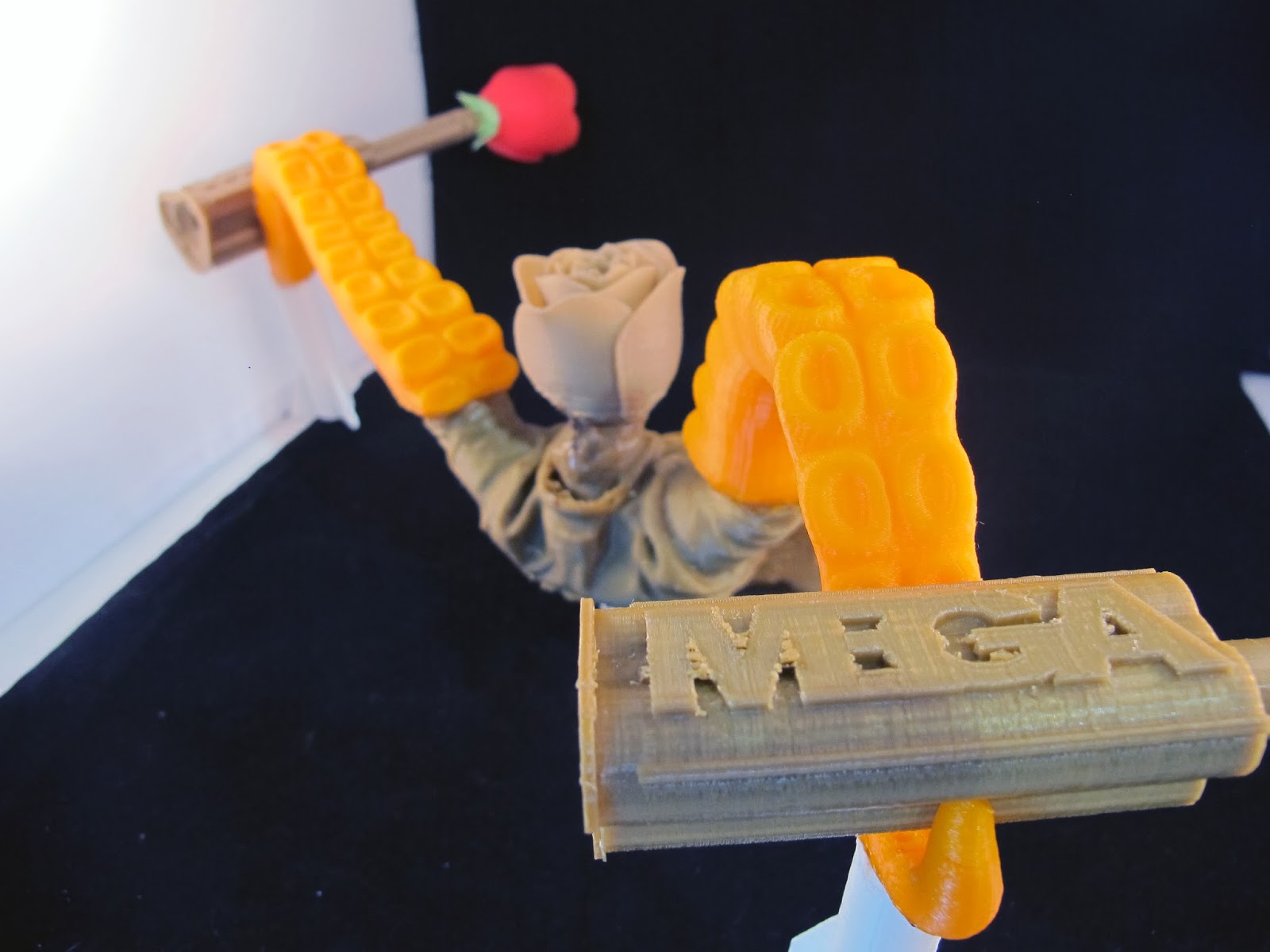
I spent some time digging through the box to create a sculpture from failed and discarded prints. Since we design and print a myriad of things from engineering parts to organic shapes, it was an interesting melange of components to choose from. 

We had a number of MegaFire and SlugFire shells that failed for various reasons or were made prior to additional revisions that lead to our finished retail ready products for NERF blasters.  We also had a number of failed flowers from another project that we undertook for Valentines Day. 

Obviously it's time to get a larger photo tent :)

Shifted Perspective

Shifted Perspective

Shifted Perspective


Friday, January 31, 2014

Superstorm School!

It's been a hectic week. School started on Monday and I have classes Tuesday, Wednesday and Thursday.

I have discovered a perk of NOT attending a private school: flat rate tuition. I am taking 18 units (well, 15 until my independent studies section is approved) for the price of 6.1-12 units.

Say what?

At AAU, the same number of units would run about $14k.

I have also crashed my first class, ever. In all my years of college, I've never had such restrictive enrollment. Typically I just enroll like the first day enrollment opens (community college and AAU worked this way). This time around it was tiered enrollment. I could enroll in up to 7 units at orientation, then I had to wait a month to enroll in up to 15. Then a week after that I could enroll in up to 19.

Unfortunately, every single class I wanted was full by the time my enrollment time for the second round came up. I had just checked class enrollment levels half an hour prior to my enrollment time. I logged in at 1 minute to 5 and by the time I entered the class numbers, all of my classes were full.

Eventually I got enrolled in some classes. Some that I really didn't want but I had the units. One of the classes had an instructor that was half an hour late, swayed back and forth and had voice modulation issues. I had a severe case of motion sickness by the end of class. Here's a sample of what I sat through.


The next night I saw that there were 5 seats open in the Gerontology class I really wanted. I made the bold choice to try to crash that class even though I had another class at the same time. Well, apparently everyone else had the same idea. There were 65 seats in the class. The instructor had already given 8 add codes out and was capping enrollment at 75 students. A total of 90 people showed up. I was totally making myself sick with trying to decide to sit it out and see what happened (hoping a bunch of people really didn't want to study death and end of life issues) or run over to the gym to the class I was actually enrolled in.

I stayed. And so did 15 other people. It came down to putting names in a box and randomly selecting 3 people. Thank Jebus I was the first name drawn! I was so worried I skipped the first class of leisure and recreation for nothing.

As far as my independent studies class goes, it is going to basically be artistic reproduction using new and emerging technologies. I will do 4 projects (from creating the artwork in physical or digital representation reproducing those works using various methods incorporating technology) and write a final paper. I'm super excited about this. This means I get school credit for stuff I would normally be doing 4 days a week anyway (with my school schedule, there's no real way I can go to the Gnomery on Tuesday, Wednesday or Thursday).

I am also fairly stoked on my textiles class. Textiles? Yeah. After discussing with the department chair my ultimate goals, we came to the conclusion that textiles would be a great place to focus my energies. People are intimidated by fine art. If you aren't an artist, you aren't really going to feel comfortable painting a picture or drawing or sculpting. But people are far less intimidated by crafts. I'm learning hand sewing, crocheting, embroidery and the like. These are skills that are far less intimidating to most people.

Not quite underwater basket weaving. Maybe that's a more advanced class.


Tuesday, January 21, 2014

Matter Control Set Up

Okay, I didn't get the video done this morning. But I had a good reason. I had to go over to City Hall in San Leandro and get Mind-2-Matter's business license! I've been trying for a couple of weeks to get over there, but the planning department has wonky hours. They work a full day Monday and 8-12 Tuesday through Thursday and are closed on Fridays. Yesterday was a holiday (and last week I don't think I ended up in San Leandro during business hours), so I got it taken care of today.

I did get some screen captures done of the set up for Matter Control today. I haven't had a chance to run anything yet (there are never enough printers because we're so busy!), but set up is super easy.

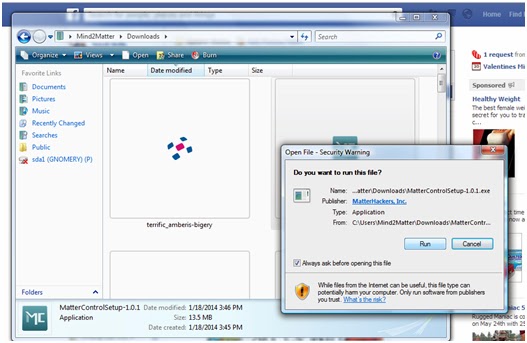
The usual - download the file and run it. 

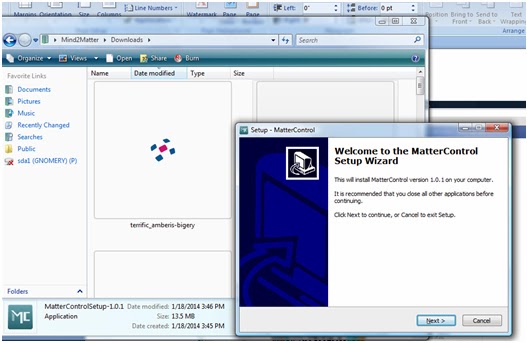
Follow the Setup Wizard (I'm pretty sure you don't need a play by play of this step)
I'm jumping ahead to opening the program in the next step so don't think you missed anything. 
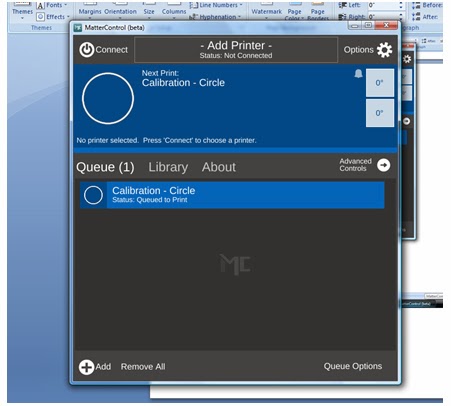
This is the default screen when you open it for the first time. 
This is where you will set up your printer (and where I found out about the Airwolf printers. I want to get my hands on one so I can see if it lives up to such a badass name).

Click on the center where it says "add printer".


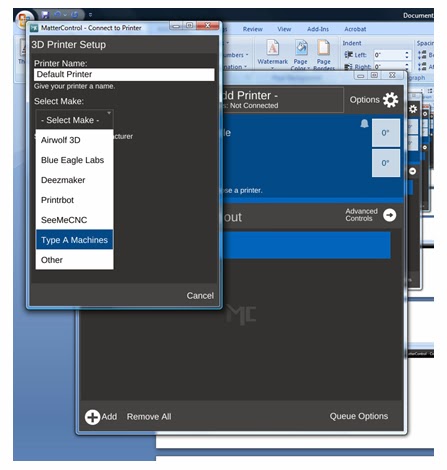
In this screen you can name your printer (really helpful when you have a wall full of printers to try to keep straight) and you are able to select your make and model of printer (which will lead you to the right drivers to install).

They are listed in alphabetical order, but look there's the Airwolf!
Really though, if you want dependability, go with the Type A Machines - We're running 5 right now!
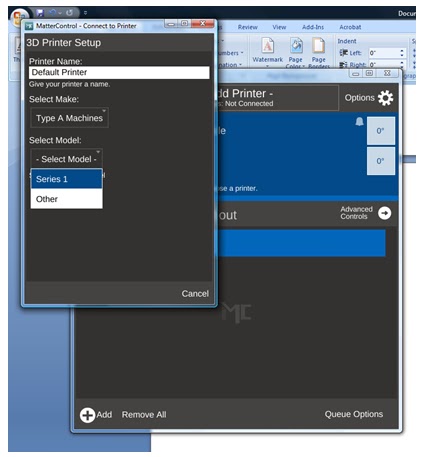
Select your model - We've got the Series 1. 
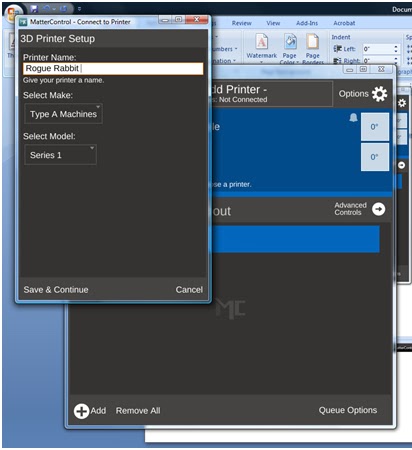
And choose a name. Obviously - Rogue Rabbit is an appropriate name.
Maybe when we get the Tantillus printers up and running, I will make one named Rogue Rabbit. 
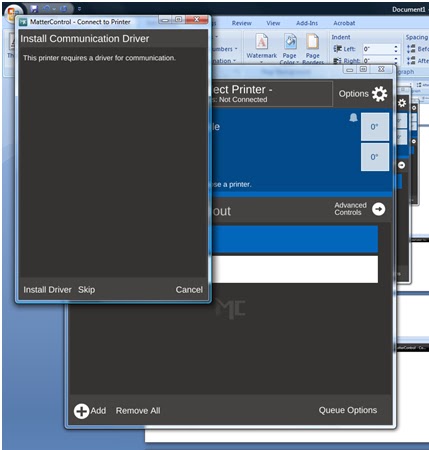
Install your drivers. 
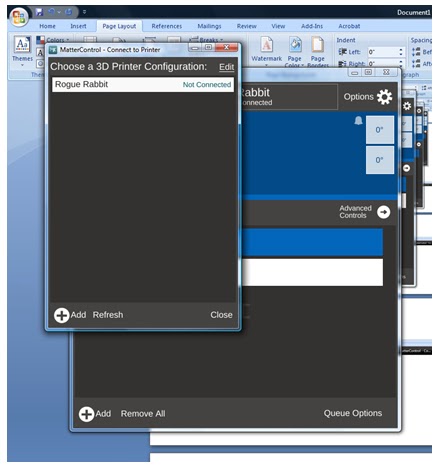
After installing drivers and testing communication, you are ready to choose your printer. 
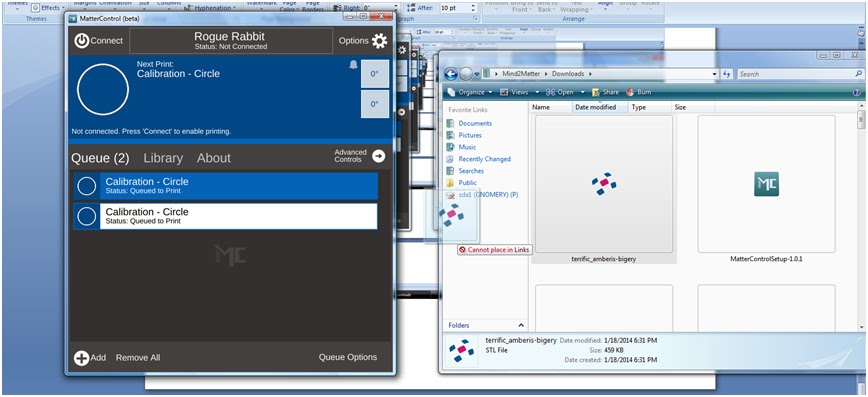
Here's one of the cool parts - Drag and drop file queuing. I've downloaded one of my models from TinkerCAD,
and just dragged it over to my queue.

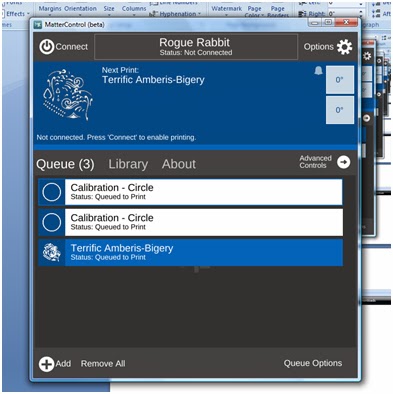
And here's my file added to the queue. 
I'll try to get my hands on a printer tomorrow to run a print job.

Like I've said, I'm a total novice when it comes to printing. Justin has ALL the printing skillz because he's seriously spent like the entire last year with the printer. He knows the ins and outs better than anyone does of the Type A Machines Series 1. He also knows the hassles of other printer controllers.

I'll play with it and ask his opinion on it as an "expert".

BTW, added a few new pieces of art to our Society6 page, including this awesomeness! I don't even like throw pillows, but I would order one.


Everyone needs a day off.

I was all super ready to do a run down of Matter Control today. Well, life happens and it was a beautiful day at the beach with my family.

We go to Blind Beach as a family on Jan. 20th to remember my brother, Jesse, each year. It is a place filled with great family memories, I got married there and it's the beach from the end of the Goonies.

Does the arch look familiar?!
It definitely does NOT feel like January. In the least. It was like 70 degrees and sunny with barely a breeze. You can't even get that weather in July around here (we had overcast and cool weather for our June wedding).


I'll be home in the morning (it's about 12:30 a.m. and I'm at the Gnomery) so I will do the video walk through of MatterControl set up on Desky. I've got Screencast-O-Matic installed on Desky and makes recording video/audio a snap. It's also a bit better than just posting some pictures of screen shots.

I have to say that I've done the set up, played around with it and Matter Control should be a breeze for novices. Considering we have only had one printer at home (well, there was a bit of time we had 2 printers at home) and it was being used for making $$$$, I never really got a chance to play around with some of the other controller software out there. I can tell you from watching Justin spend countless hours figuring it all out, none of them are as straight forward as Matter Control.

Matter Control introduced me to the Airwolf line of printers. While we exclusively use Type A Machines Series 1 printers, I'm slightly obsessed with the Airwolf printer. Really only because it has such a badass name. I've had the Airwolf theme song stuck in my head since I saw the printer.


I can't attest to how Airwolf printers work (though if the makers want us to test head to head on a commercial level versus the Type A Machines, we'll gladly test it for you!), and I know they currently come with a much larger diameter hot end (.5 is their standard with a .35 hot end available sometime in the spring), so it's comparing apples to oranges.


Wednesday, January 15, 2014

Piper Pillows?! (LaserGnomes are on Society6)

I've finally gotten around to putting my photography and art up on Society6. While I could technically take care of getting prints made, it's a lot easier to outsource it. I don't have to worry about making/obtaining the print, shipping, etc and Society6 can offer products that I can't such as iPhone cases, tote bags, throw pillows and the like.

I mean seriously can you resist a Piper Pillow?
I want to order one for Piper!
I haven't been to the Gnomery in 3 days! It's a bit weird, but I am working "out of the home" on some illustrations for an upcoming project.

I used the Microsoft Surface Pro 2 yesterday to work on one of my pieces and it was AWESOME. It was like a mini Cintiq! We have the 256G model with 8GB of RAM. Um seriously, I was so jealous. It's a tablet that is better than both my lappy (6GB of RAM) or my desky (only a piddly 2GB of RAM)! The ElderGnome managed to get his hands on one and they have been out of stock FOREVER!

We got it to use with the Sense 3D scanner (the Surface Pro 2 has USB onboard) but it's also AMAZING for PhotoShop and Illustrator. There's a bit of adjusting (I'm used to full keyboard and the Wacom Intuos 4) but I really loved the performance. The only problem I ran into was serious arm pain today. The screen isn't as large as my Intuos surface (or any of my sketchbooks), so I was using a lot more fine motor control, which causes my arm and hand pain to flare up.

On the 3D printing front, Justin was insanely excited by the beta release of MatterControl, a new printer controller. I haven't had a chance to see it in action but Justin was super excited when he called me from the shop about it. In reviewing the features, I can see why he's excited.

  • It's "plug & print", which he probably isn't super thrilled about but new users will be. 
  • SMS and Email notification - That's a pretty big deal. Knowing a print is complete (or not), helps us plan our day a bit more accordingly. Say we go home for the night, it will be great to know if the print is actually done instead of going in and hanging out until it finishes (also great if you need to go out to lunch or run errands). 
  • Drag and Drop queuing - Drag and drop always makes things flow a bit better. 
  • Design Library - This is pretty sweet. It allows you to organize and store your print files. 
  • Advanced Plating - This is pretty exciting. Automatically detect multiple parts within a single design file and then individually manipulate, scale, rotate, and mirror those parts.
Like I said, I haven't seen it in action yet, but it sounds pretty awesome. I think the feature that was most exciting (to Justin, Elijah and possibly Levi) was that you can name your printer(s). That might not seem like much, but when you have 5 printers running, names help instead of COM PORT numbers.

In fact, we're having a naming contest. Suggestions can be made on the LaserGnomes Facebook page. 

Thursday, January 2, 2014

It Never Stops (and we wouldn't have it any other way)

Oh my damn. So many things to write about.

First of all Happy New Year! I've been slacking but it's been a busy couple of weeks!

LaserGnomes/Mind2Matter is all moved in to our new location in San Leandro with Type A Machines!


Rod, Justin and I!

I totally thought I had more pictures on my phone/camera but I've been so excited to just make things and get set up, I have been slacking on the photos!

I'll get some tomorrow of the nearly completed space.

I do have pictures of some of my projects. I want to test out scanning equipment on sculpture, so I have been working with Sculpture House Prima Plastilina Modeling Clay, Sulphur Free, Light Tan, 2 lb - 2 lb, which is an oil based clay that does not dry out. I've never worked with it before and was sort of worried about the "hardness" of it (I put off model making 1 forever and a day because of the thought of using it). When Justin used it for school, he was warming it in the oven to soften it and then you ran into the issue of it getting too hot and burning your hands.

Well, I discovered the wonders of the heat gun. I've used the heat gun for finishing PLA and doing some welding/shaping work in PLA, so I grabbed it to use on the plastilina. It works wonders! How a heat gun is NOT a part of your materials list for classes that require it is mystery to me!

I definitely needed a break from working with it today, as my hand and arm hurt a lot but Wintergreen Essential Oil. 10 ml. 100% Pure, Undiluted, Therapeutic Grade. has been a lifesaver when it comes to pain caused by over exertion. I have 20:80 dilution mixed up at all times (usually adding wintergreen oil to avocado oil or coconut oil as a carrier) and it works wonders. I even gave some to my mom for her horrible chronic foot pain and she said it helped really quickly.


I had a couple of kids request a fairy sculpture when I went to the Creative Learning Loft Christmas party, but it's turning out to be a bit more elfin than fairy. I'm not one for fairy princesses anyway :)

All I can say is this is a really exciting time and I'm so proud of my husband for keeping at 3D printing even when it was frustrating beyond belief. We had an idea of where we wanted to land, but weren't sure how we were going to get there.

We now have a wonderful creative space and are making money doing what we love. We can even take the Pi to work with us.


We will be having an open house/shop warming party in the near future. Keep an eye out for the info!

BTW - I haven't forgotten about the whole 3D modeling software trials. Between the move and holidays, it's been busy and in all honesty, it's faster for me to bust out the clay. I spent hours trying to figure out how to do fairy garden fence pieces using software and had doors in 3 sizes, a fence and part of an elfin creature done in an 8 hour day.

Friday, December 20, 2013

The Gnomery (Gnome Sweet Gnome)

I haven't forgotten about my reviews of 3D modeling software. I really haven't.

But it's been quite exciting around here nonetheless.

The Gnomery is moving. We picked up keys and started moving furniture in today!


I spent much of yesterday working with ComposiMold, which I had come across at MakerFaire earlier this year. It's a reusable molding compound for making a variety of molds (including 2 part, push molds and more). It comes in a variety of formulations, including FC, or food contact.

I ordered my ComposiMold through Amazon and it arrived in 2 days as Prime Shipping usually does (I say usually because I had one item show up like 5 months later after a replacement had already been sent out).

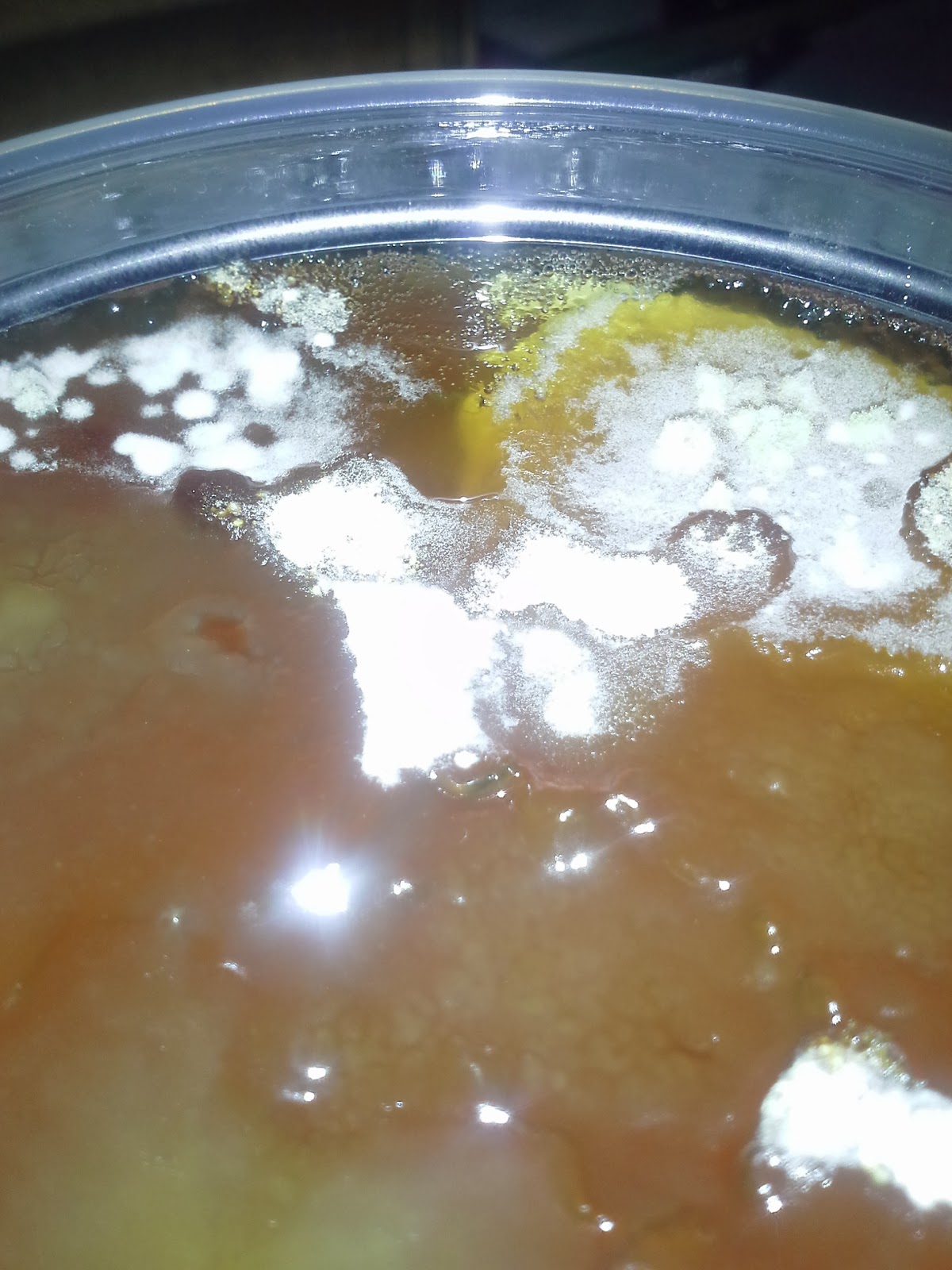
Unfortunately, the top of the container was contaminated with mold!


I was totally bummed and reached out to ComposiMold on Facebook. Granted it was like midnight when I posted the pictures, I didn't really expect anything to happen right away.

Well, when I got up the next morning, I had two responses to my post and a separate email from ComposiMold. They apologized profusely and have issued a replacement AND refunding my original purchase price in order to make things right.

Later in the day, I even received a voicemail from Sean at ComposiMold apologizing for the situation.

Even though my initial experience was less than stellar, they have worked really hard to make it right. It is really rare to find good customer service (let alone any customer service) these days, it was awesome to have a company be so responsive to a problem.

I can't post any pictures of the project since it's Christmas and all (don't want to give away the goods!). I'll post pictures once I've given the gifts.

We picked up some furniture from Moving Sale (our local second hand shop), including a super sweet whiteboard set up! Unfortunately, it was about 5 pm when Rod got into town with the kiln hoods so traffic was horrendous getting out of the city. I think it took more than an hour to get there (The ride home took less than 20 minutes without traffic).

Justin opening the door with our key for the first time!

Our spot. The room is about 8k sqft and we have an area about 18' x 34' with room for expansion.
I can't tell you how exciting this is. A year ago, we were getting our 3D printer. We had a dream to put it to work for us. We didn't know how we were going to do it, but that was the plan. We've had our ups and downs with the printer itself. In fact, take a look at my first post, Type A Machines Series 1, it was quite the learning experience.

A photo from my first blog post about 3D printing. Our failed print graveyard. It got larger, much larger over the last year. 

Today we are setting up our future. We had an idea and we've stuck it out. We have gone from the above results to print on demand fulfillment, including 3D scanning and metal casting. Some didn't have faith in our dream but we did and now it is paying off. My husband's perseverance through this project has been nothing short of amaze (and yes, I meant to type amaze).
Sometimes it has been nerve wracking. My poor husband stays up all night working. I have felt tremendous guilt for being busy with an outside job and school, but we've pressed on. Big things are happening and I'm filled with gratitude to be a part of it.