Showing posts with label Curvy3D. Show all posts

Thursday, December 12, 2013

3D Sculpting Software - Curvy 3D - Day 2

I'm still playing around with Curvy3D. I am going to work with Justin to try to come up with good evaluation tools from his standpoint (i.e., how the models will work for printing, etc.) to try to evaluate if the program works for our overarching needs, not just my desire to make organic shapes (really, what good is the model going to be if it doesn't print?!).

The other project I was working on was the Rufio costume for a friend. A friend approached me yesterday afternoon with the need for a Rufio costume for a party that started at 4 pm today! 

Not sure who Rufio is? A character from 1991's Hook. A bit random, right? Especially for a Christmas party. 
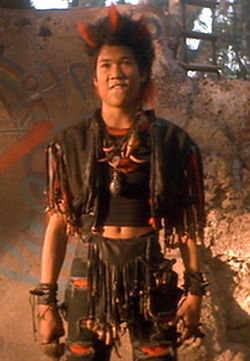

Here's the result:


I altered the jacket and made the necklace, including the beads. 

Not bad for such a quick turnaround. 

So with that taking up a bit of time (but amazingly not as much as I expected), I played around with Curvy3D. 

Keep in mind, my area of design is 2D. I'm great with Illustrator, Photoshop, etc. I have the hang of TinkerCAD as far as 3D goes, but I am, by no means experienced in 3D modeling. I have played a bit with Inventor (Autodesk) and AutoCAD (Autodesk). 

I really want a program that I can pick up my stylus and "draw". I played a bit with Sculptris but didn't really "get it" super quick (I will return to it after playing with Curvy3D). 

Here's my first attempt at really playing around with it doing more than just "what does this icon do?"

As you can see, I watch a lot of Ancient Aliens
Is this what our alien overlords will look like?


So this was created using some basic tools including "Create Cylinder", "Pull Tubes", "Add", "Sub" and "Smooth". 

I didn't really have a plan and wasn't entirely certain what I was doing, I sort of started "pushing" and "pulling" the clay and playing around with it. 

I've exported it as an .obj file so Justin can evaluate it's usefulness in 3D printing. He's currently working on a 3D printed trailer for a trailer park (the things people want), so I'll probably have a better idea as to the immediate usability of the model tomorrow. 

On an aside, I'm not exactly sure when my entire Pinterest feed began getting flooded with fashion and mens grooming products (pretty sure the grooming products being as hipstery as they are are courtesy of Shoppe Mob). I've got to start following some better boards. 

Any suggestions?

3D Sculpting Software - Curvy 3D

I'm trying to find a 3D modeling software that is relatively easy for a beginner to navigate. 

Everyone knows how much I love TinkerCAD but for a lot of what I want to do, it can't create organic shapes. You can only do so much creating .svgs in Illustrator and importing into TinkerCAD. I can't chamfer or bevel, I can't create fillets. 

I can use Autodesk's Inventor or AutoCAD but I really want to work organically. My other thought was to sculpt everything by hand and use the Sense 3D scanner to create models, but really, I should learn how to model digitally. 

I don't have the education that Justin has (and that is why he has an INTENSE understanding of models) and don't necessarily need to. But I need to be able to create organic designs digitally. I need to be able to do more than extrude an .svg file and print that (really, I could just be using a laser cutter, which is much faster and I could work in a variety of materials for that). 

To truly take advantage of what we are building, I need to model. 

I'm trying a bunch of programs out, either freeware or on trial basis, in the next few weeks to see how I feel about them and try to judge their ease of use. I want to find a program that a novice could play around with and not be frustrated. 

Enter Curvy3D. I'm going to play with it for at least a week. I started playing around with it today, but got a request to help make a Rufio costume by tomorrow. So I took the opportunity to carve some dragon's teeth for a necklace, make a mold and create custom beads for it. We also do some low tech manufacturing here was well. It's not always lasers and PLA :)

Clay "dragon tooth" (left) and inverse mold (right)
The beads are in the oven and will be assembled in the morning. 

Just in case you don't remember Rufio, here's a photo


I didn't really get far enough into Curvy3D start getting into the nitty gritty, but it allows me to start doing what I had planned for in my designs. There is a 30 day free trial (that's how I'm checking it out) and the normal cost is $99.00. It is currently discounted 25% for a sale price of $74.25. That's not bad considering the intense investment most other software entails. 

I plan do to some screen captures and possibly some videos while I'm playing around with it, which I will share here. Some others I am checking out will be Wings3D, Sculptris and Modo. 123D Sculpt (autodesk product) is, unfortunately, iPad only. So that's not going to be in the running.